


 Amazing Race
 Choose Wisely
 Unlock the Box
 Mall Hunters
 Mission Impossible
 The Great Charity Race
 Clues to a Mystery


 Random Acts of Kindness

 Where in the World is the Crystal Snow Globe?
 The Big Escape
 Team Trivia
 The Feud
 Summer Olympics
 Winter Olympics
 Who Kidnapped Santa?




“Coffee that appears the moment you want it,” someone argues. “How is that not the winner?”
In this sample virtual opener, a small team is choosing an impossible meeting-room upgrade. Instant coffee has supporters. But another colleague wants the undo button: rewind the last thirty seconds of any meeting. The catch? Every press triggers ten seconds of hold music.
“Can we undo the hold music?”
Nobody has shared a fun fact. They already have something to discuss.
These three virtual icebreaker games give unfamiliar colleagues one small, amusing thing to accomplish together before asking anyone to be interesting on demand. Choose one opening segment to brief as part of a custom Social Scavenger event:
- One Upgrade, One Catch: six minutes of negotiation around a concrete choice.
- One Picture, Two Worlds: seven minutes of noticing details and inventing explanations.
- The Six-Word Adventure Trailer: nine minutes of shaping a tiny story together.
Those are suggested playing blocks—not total calendar commitments. Joining, instructions and transitions need their own time.
For these openers, plan teams of three to five. Each team receives its challenge in the app-based experience, discusses it on the event call and submits one shared answer using Social Scavenger’s free-form text challenges. Most Social Scavenger virtual games run in a mobile or desktop browser, with one Tech Captain signing in for the team. Confirm that access arrangement for your custom event; everyone need not download an app.
One Upgrade, One Catch: make the ridiculous deal acceptable
The interesting part is not picking the most powerful invention. It is deciding what would make everyone willing to use it.
The challenge in the app:
Choose one impossible meeting-room upgrade:
A: Coffee appears instantly, but every cup recites a twenty-second weather forecast.
B: An undo button rewinds the last thirty seconds of the meeting, but every use plays ten seconds of hold music.
Keep your chosen drawback. Add one rule that makes the upgrade acceptable to your team. Before submitting, invite an improvement from someone who did not make the first pitch. Submit your upgrade, its drawback and your rule as one team response.
The team initially favors the undo button because mistakes could disappear. Then someone asks: “What if the bit you undo was someone else’s useful point?”
That question changes the deal. The button needs permission, not just a convenient position beside the speakerphone.
The shared submission:
We choose the thirty-second undo button. We keep the ten seconds of hold music. Our rule: everyone present must agree before anyone presses it.
The person who questioned the first idea has helped make the final choice—not merely waited for a turn to speak. The captain reads it back, submits it in the app and the team is ready to move on.
Six minutes of play: one to read and think, two to compare upgrades, two to negotiate the rule and one to read back and submit.
Use it for: a newly assembled project team that would prefer two concrete options to a blank creative canvas. Choose another opener if fictional meeting frustrations would feel too close to a difficult discussion already on the agenda.
One Picture, Two Worlds: let the overlooked detail change the story
A duck on vacation is an obvious explanation. Then somebody notices the enormous key.
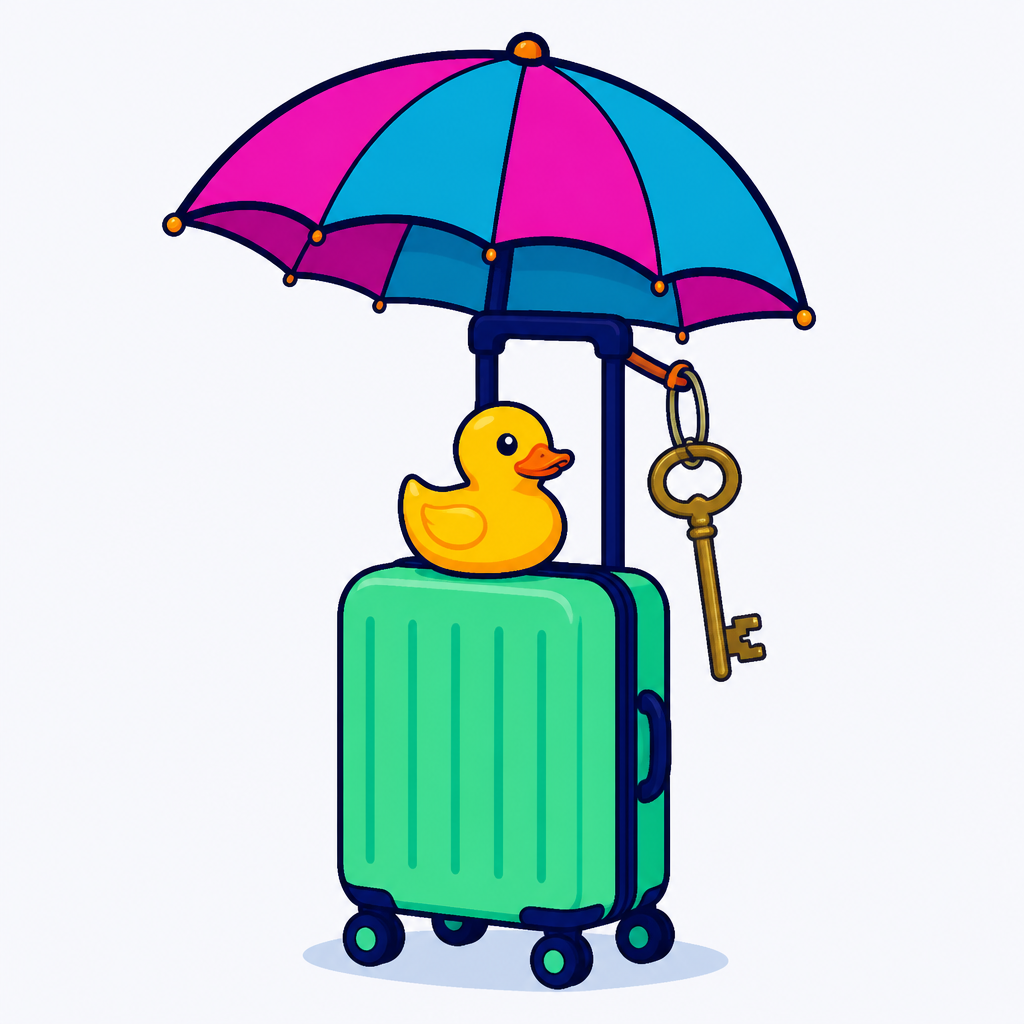
The app challenge includes this illustration and its written description: A yellow rubber duck sits on a small wheeled suitcase. An open umbrella is attached to the suitcase handle. A large key hangs from that handle. The background is plain.
The challenge in the app:
Give this picture two different explanations. For each, say what is happening and use at least two pictured details to support your story. You can work from the image, its description or both.
Keep both explanations; there is no correct answer and no vote for the funniest one. Before submitting, ask which detail someone else noticed. Submit your two explanations together.
“A duck on vacation” gets the conversation started. A teammate points to the key: perhaps the duck is not the guest. Perhaps it runs the place.
Another notices that the whole building could roll away. The holiday becomes a mobile hotel. For the second interpretation, someone turns the umbrella from a roof into a sail.
The shared submission:
1. A mobile hotel: the duck is the concierge, the umbrella is the roof and the large key opens the penthouse. The suitcase wheels let the hotel follow good weather.
2. A getaway boat: the suitcase is the hull, the umbrella is the sail and the duck is the captain. Its wheels mean the escape can continue on land.
Both explanations stay in the app answer. Nobody has to defeat another person’s idea to make room for their own.
Seven minutes of play: one to examine the image and description, two for the first explanation, two for a contrasting story, one to check the supporting details and one to submit.
Use it for: a workshop or onboarding group where you want observation to matter as much as invention. Someone can change the answer simply by asking, “What is that key for?” Choose another opener if the image and description cannot be made accessible to the group in the available format.
The Six-Word Adventure Trailer: put lunch in charge of navigation
This is a writing game, not a filming assignment. The team needs six words and an adventure worth wondering about.
The challenge in the app:
Your expedition has landed on a wandering island. Your map has blown away. The only compass points toward sandwiches.
Write a six-word trailer for the adventure ahead. Build one line together rather than holding a contest between individual entries. Try changing a word using someone else’s suggestion.
Submit the final six words, followed by a separate sentence explaining what changed. No recording or performance is required.
The first draft sounds reassuring: “Our map vanished. The compass knows.”
Then someone suggests replacing “compass” with “sandwiches.” If lunch determines the route, perhaps lunch knows more than the expedition does.
The shared submission:
Our map vanished. The sandwiches know.
We changed compass to sandwiches because our navigation depends on finding lunch.
The trailer contains exactly six words; the explanation sits outside that count. A single suggested word changes a sensible adventure into a suspicious one. The team checks the wording together before the captain submits it.
Nine minutes of play: one to read the premise, two to suggest story directions, three to combine a line, two to edit and count its words, and one to submit.
Use it for: a group that enjoys shaping language together. Offering one word, spotting a missing story beat or checking the count are all useful contributions. Prefer the upgrade or picture opener if word-counting or differences in working-language fluency would dominate the conversation.
Seven minutes of play needs a larger calendar slot
A seven-minute game cannot also contain four minutes of password trouble. Protect the discussion block instead of shrinking it whenever joining takes longer.
| Time | What happens |
|---|---|
| 0–4 minutes | Join the call, establish team game access and check audio. |
| 4–6 minutes | Explain the task and move into teams. |
| 6–13 minutes | Play the seven-minute challenge, including submission. |
| 13–15 minutes | Return to the main call or transition into the next activity. |
Allow more startup time when participants are unfamiliar with the tools or need access support. Keep the same teams for the next activity where practical; a warm-up does not need a second round of introductions.
Brief the shared task—not a performance
The host can say:
You are making one answer together. You can contribute an observation, a choice, a word or a useful question. You do not need to share anything personal or appear on camera. Before your captain submits, check whether another person’s idea changed what you made.
Give people quiet thinking time before discussion. Invite contributions without requiring a round-robin performance. Someone can pass on speaking and suggest wording through an agreed accessible communication channel. The captain handles submission, not automatic authorship.
Arrange captions, direct access to accessible digital prompts and clear instructions for entering and leaving breakout rooms. For the picture game, include the description and read it aloud when helpful. W3C’s remote-meeting guidance recommends accessible materials and cautions against relying only on screen sharing. Camera-optional participation alone does not resolve every access need.
Request equal completion credit in the app, with no speed or humor bonuses and no elimination. Social Scavenger supports challenge values and human judging; agree who reviews responses. After submission, move on rather than turning the opener into a presentation or judging ceremony.
When to skip the opener
Skip it when the meeting concerns urgent or sensitive news, the group needs a genuine screen break, or access problems remain unresolved. A familiar team already talking comfortably may need no warm-up.
Also check the next activity. If it already gives everyone a small collaborative task, another opener may only delay the good part. And if the entire available slot is five minutes including joining, do not squeeze a six-minute game into it.
Send a brief that protects the small shared win
Choose the interaction first, then confirm the custom work, access and hosting arrangements. This inquiry keeps the request bounded:
We are planning a virtual event for [number] colleagues on [date and time zone]. We would like [chosen opener] as a custom opening segment, with teams of three to five, app-delivered prompts and one shared text submission per team.
Please allow [six/seven/nine] minutes of play separately from joining, instructions and transitions. We want no required personal disclosures, photographs or performance, and equal completion credit rather than speed or humor scoring.
Our access requirements are [requirements]. The next activity is [activity]. Please quote the custom work and confirm team access, image and description delivery if applicable, who hosts the call and team transitions, who reviews submissions, and who can see the answers.
The finish is modest: the team has made something together, and someone can recognize their contribution in it. Sometimes that means protecting a useful point from the undo button. Sometimes it means putting sandwiches in charge of navigation.