

 Amazing Race
 Choose Wisely
 Unlock the Box
 Mall Hunters
 Mission Impossible
 The Great Charity Race
 Clues to a Mystery


 Random Acts of Kindness

 Where in the World is the Crystal Snow Globe?
 The Big Escape
 Team Trivia
 The Feud
 Summer Olympics
 Winter Olympics
 Who Kidnapped Santa?




Already have your scavenger hunt challenges ready? The next step is to connect them into a game that keeps players curious. Mix challenge types, use locked challenges to guide progress, and reward completed tasks with clues to a final puzzle.
This Part Two guide explains how to add those details in Social Scavenger, plus how to turn your teams’ submissions into a memorable post-hunt recap.
Need the basics first? Watch this quick video on how to build your scavenger hunt for an introduction to setting up your game.
Build Better Scavenger Hunt Challenges
Your game does not have to follow a single format. You can build a treasure hunt, a race-style adventure, a trivia game, or a mix of activities that fits your theme.
One piece of content can inspire several different challenges. For example, embed a YouTube movie clip and use it as the starting point for:
- A trivia challenge: “What movie is this famous clip from?”
- A video challenge: “Record your team’s best impersonation of this scene.”
- A sticker challenge: “Pose with the famous hat from this film clip.”
Choose the format that suits the task. Trivia tests knowledge, while performance-based challenges give teams something creative to do. Keep each instruction specific so players know exactly what to submit.
Link Challenges to Control the Order
Challenge locking lets you make one challenge available only after another is completed. Use it when you want players to follow a sequence, discover a surprise, or earn access to a final puzzle.
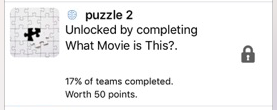
In the example below, players can see that a locked puzzle is worth 50 points, but they cannot open it until they complete “What Movie is This?” The points provide an incentive without revealing the task.
Planning tip: Lock challenges when the order matters, rather than locking every task. If a required challenge is difficult, prepare a hint or tell players how to ask the organizer for help so one obstacle does not stop their game.
Use Clues, Challenge Rewards, and Combo Rewards
Rewards can do more than recognize progress: they can give players information they need later. Decide whether each reward should be tied to a particular task or to a completion milestone.
- Challenge rewards: Attach a reward or clue to an individual challenge. For example, completing a trivia question could reveal one letter of a mystery word.
- Combo or completion rewards: Reward players for reaching a set number of submissions, such as completing their first challenge or finishing the game.
Example: Build a Three-Clue Word Puzzle
A word jumble is a simple way to connect otherwise separate challenges. Here is a sample structure you can adapt to your theme:
- Choose the final answer. For this example, use the word “SUN.”
- Create three clue challenges. Give each one a different letter reward: U, N, or S.
- Reveal a letter after each challenge. Once players complete all three, they have the letters needed for the final answer.
- Add a bonus question. Ask, “Unscramble your three letters to name the object that lights the daytime sky.”
The final hint makes the intended answer clear. For your own hunt, choose a word connected to the event, destination, or story, and check that the clues point to one answer.
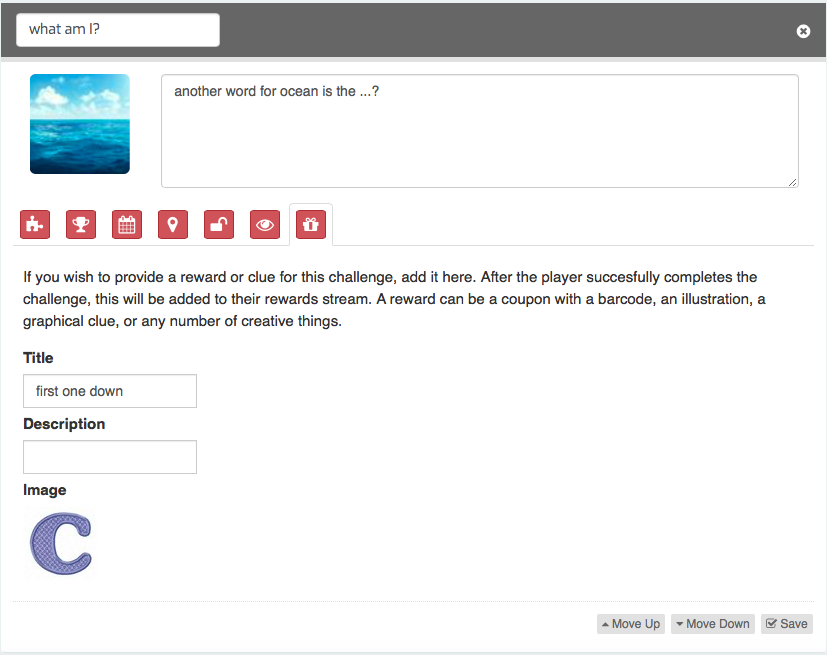
In the example below, a letter clue is uploaded as an image in the challenge’s rewards and clues settings. You can also add a title to help players identify the clue.
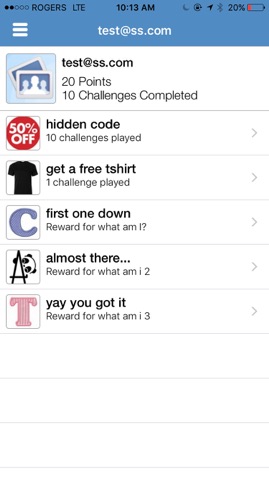
After players complete the challenge, the clue appears in their rewards area. This gives them a place to review the information they have collected before attempting the bonus question.
Test Your Clues Before Launching
Walk through the game as a player before inviting your teams. Check that:
- Each challenge clearly explains what players need to submit.
- Locked challenges become available in the intended order.
- Every required clue is attached to the correct challenge.
- The collected clues are enough to solve the final puzzle.
- Embedded clips and clue images are easy to view on the devices players will use.
Plan Your Post-Hunt Highlights
The fun does not have to end with the final challenge. Social Scavenger’s live stream lets players view team submissions as they come in, giving them a chance to enjoy other teams’ creativity during the game.
Teams may be too busy playing to catch everything in the live stream. After the hunt, you can export the content gathered during the game and use it for a shared recap.
Choose a few standout moments, invite teams to explain how they approached a challenge, and celebrate creative solutions alongside the final scores. Before showing or sharing participant footage, make sure everyone is comfortable with how it will be used.
Want help with the after-party video? Contact us to ask about putting together a post-hunt video featuring your teams’ best footage set to music.
A few thoughtful details can turn a list of tasks into a connected adventure. Start with varied challenges, add clues that have a purpose, and give teams a chance to enjoy what they created.
Need help designing your scavenger hunt? Reach out to Social Scavenger for help creating a game for your players.